




演示网站 react大转盘九宫格抽奖插件
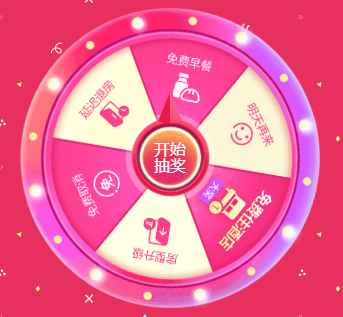
lucky-canvas
一个基于 Js + Canvas 的【大转盘 & 九宫格】抽奖,致力于为 web 前端提供一个功能强大且专业可靠的组件,只需要通过简单配置即可实现自由化定制,帮助你快速的完成产品需求
在 Js / JQuery 中使用
方式 1:通过 script 标签引入
为了避免 CDN 链接出现异常或波动,我非常建议你缓存到本地或服务器
指定版本: https://cdn.jsdelivr.net/npm/lucky-canvas@1.4/dist/lucky-canvas.umd.min.js
|
1
2
3
4
5
6
7
8
9
10
11
12
13
14
15
16
17
18
19
20
21
|
<div id="my-lucky"></div><script src="https://cdn.jsdelivr.net/npm/lucky-canvas@1.4/dist/lucky-canvas.umd.min.js"></script><script> // 大转盘抽奖 let luckyWheel = new LuckyCanvas.LuckyWheel({ el: '#my-lucky', width: '300px', height: '300px', }, { // ...你的配置 }) // 九宫格抽奖 let luckyGrid = new LuckyCanvas.LuckyGrid({ el: '#my-lucky', width: '300px', height: '300px', }, { // ...你的配置 })</script> |
在 vue2.x / vue3.x 中使用
方式 1:通过 import 引入
首先安装插件
|
1
2
3
4
|
# npm 安装:npm install vue-luck-draw# yarn 安装:yarn add vue-luck-draw |
然后找到 main.js 引入插件并 use
|
1
2
3
4
5
6
|
// vue2.ximport LuckDraw from 'vue-luck-draw'Vue.use(LuckDraw)// vue3.ximport LuckDraw from 'vue-luck-draw/vue3'createApp(App).use(LuckDraw).mount('#app') |
最后在组件内使用 <LuckyWheel />大转盘组件 或 <LuckyGrid />九宫格组件
|
1
2
3
4
5
6
7
8
9
10
11
12
13
14
15
16
|
<template> <div> <!-- 大转盘抽奖 --> <LuckyWheel width="300px" height="300px" ...你的配置 /> <!-- 九宫格抽奖 --> <LuckyGrid width="300px" height="300px" ...你的配置 /> </div></template> |
方式 2:通过 script 标签引入
为了避免 CDN 链接出现异常或波动,我非常建议你缓存到本地或服务器
vue2.x:https://cdn.jsdelivr.net/npm/vue-luck-draw@3.4/dist/vue-luck-draw.umd.min.js
vue3.x:https://cdn.jsdelivr.net/npm/vue-luck-draw@3.4/vue3/vue-luck-draw.umd.min.js
|
1
2
3
4
5
6
7
8
9
10
11
12
13
14
15
16
17
18
19
20
21
22
23
24
|
<div id="app"> <!-- 大转盘抽奖 --> <lucky-wheel width="300px" height="300px" ...你的配置 /> <!-- 九宫格抽奖 --> <lucky-grid width="300px" height="300px" ...你的配置 /></div><script src="https://cdn.jsdelivr.net/npm/vue-luck-draw@3.4/vue3/vue-luck-draw.umd.min.js"></script><script> new Vue({ el: '#app' data () { return {} } })</script> |
在 React 中使用
方式 1:通过 import 引入
首先安装插件
|
1
2
3
4
|
# npm 安装:npm install react-luck-draw# yarn 安装:yarn add react-luck-draw |
然后在你的组件中引入并使用
|
1
2
3
4
5
6
7
8
9
|
import { LuckyWheel, LuckyGrid } from 'react-luck-draw'export default function Test () { return <div> // 大转盘抽奖 <LuckyWheel width="300px" height="300px" ...你的配置></LuckyWheel> // 九宫格抽奖 <LuckyGrid width="300px" height="300px" ...你的配置></LuckyGrid> </div>} |
最后我提供一个 react 的抽奖 demo 供你参考, 具体参数配置请看文档
|
1
2
3
4
5
6
7
8
9
10
11
12
13
14
15
16
17
18
19
20
21
22
23
24
25
26
27
28
29
30
31
32
33
34
35
36
37
38
39
40
41
42
43
44
45
46
47
48
49
50
51
52
53
54
55
56
57
58
59
60
|
import React from 'react'import { LuckyWheel } from 'react-luck-draw'export default class App extends React.Component { constructor () { super() this.myLucky = React.createRef() this.state = { blocks: [ { padding: '13px', background: '#d64737' } ], prizes: [ { title: '1元红包', background: '#f9e3bb', fonts: [{ text: '1元红包', top: '18%' }] }, { title: '100元红包', background: '#f8d384', fonts: [{ text: '100元红包', top: '18%' }] }, { title: '0.5元红包', background: '#f9e3bb', fonts: [{ text: '0.5元红包', top: '18%' }] }, { title: '2元红包', background: '#f8d384', fonts: [{ text: '2元红包', top: '18%' }] }, { title: '10元红包', background: '#f9e3bb', fonts: [{ text: '10元红包', top: '18%' }] }, { title: '50元红包', background: '#f8d384', fonts: [{ text: '50元红包', top: '18%' }] }, ], buttons: [ { radius: '50px', background: '#d64737' }, { radius: '45px', background: '#fff' }, { radius: '41px', background: '#f6c66f', pointer: true }, { radius: '35px', background: '#ffdea0', fonts: [{ text: '开始\n抽奖', fontSize: '18px', top: -18 }] } ], defaultStyle: { fontColor: '#d64737', fontSize: '14px' }, } } render () { return <LuckyWheel ref={this.myLucky} width="300px" height="300px" blocks={this.state.blocks} prizes={this.state.prizes} buttons={this.state.buttons} defaultStyle={this.state.defaultStyle} onStart={() => { // 点击抽奖按钮会触发star回调 // 调用抽奖组件的play方法开始游戏 this.myLucky.current.play() // 模拟调用接口异步抽奖 setTimeout(() => { // 假设拿到后端返回的中奖索引 const index = Math.random() * 6 >> 0 // 调用stop停止旋转并传递中奖索引 this.myLucky.current.stop(index) }, 2500) }} onEnd={prize => { // 抽奖结束会触发end回调 console.log(prize) alert('恭喜获得大奖:' + prize.title) }} ></LuckyWheel> }} |
在 微信小程序 中使用
#方式 1:通过 npm 安装
先找到小程序项目的根目录,看是否有package.json文件,如果没有就执行下面的命令来创建该文件
|
1
|
npm init -y |
安装 npm 包
|
1
|
npm install mini-luck-draw |
构建 npm
微信开发者工具找到左上角点击 工具 > 构建 npm > 构建成功
引入自定义组件
|
1
2
3
4
5
6
|
{ "usingComponents": { "lucky-wheel":"/miniprogram_npm/mini-luck-draw/lucky-wheel/index", "lucky-grid":"/miniprogram_npm/mini-luck-draw/lucky-grid/index" }} |
我在这里提供一个简略的 demo 供你进行测试
|
1
2
3
4
5
6
7
8
9
10
11
12
13
14
15
16
17
18
19
20
21
22
23
24
25
26
27
28
29
30
31
32
33
34
35
36
37
38
39
40
41
42
43
44
45
46
47
48
49
50
51
52
53
54
55
56
57
58
59
|
<view> <lucky-wheel id="myLucky" width="500rpx" height="500rpx" blocks="{{blocks}}" prizes="{{prizes}}" buttons="{{buttons}}" defaultStyle="{{defaultStyle}}" bindstart="start" bindend="end" /></view>const app = getApp()Page({ data: { prizes: [ { title: '1元红包', background: '#f9e3bb', fonts: [{ text: '1元红包', top: '18%' }] }, { title: '100元红包', background: '#f8d384', fonts: [{ text: '100元红包', top: '18%' }] }, { title: '0.5元红包', background: '#f9e3bb', fonts: [{ text: '0.5元红包', top: '18%' }] }, { title: '2元红包', background: '#f8d384', fonts: [{ text: '2元红包', top: '18%' }] }, { title: '10元红包', background: '#f9e3bb', fonts: [{ text: '10元红包', top: '18%' }] }, { title: '50元红包', background: '#f8d384', fonts: [{ text: '50元红包', top: '18%' }] }, ], defaultStyle: { fontColor: '#d64737', fontSize: '14px' }, blocks: [ { padding: '13px', background: '#d64737' } ], buttons: [ { radius: '50px', background: '#d64737' }, { radius: '45px', background: '#fff' }, { radius: '41px', background: '#f6c66f', pointer: true }, { radius: '35px', background: '#ffdea0', fonts: [{ text: '开始\n抽奖', fontSize: '18px', top: -18 }] } ], }, start () { // 获取抽奖组件实例 const child = this.selectComponent('#myLucky') // 调用play方法开始旋转 child.$lucky.play() // 用定时器模拟请求接口 setTimeout(() => { // 3s 后得到中奖索引 const index = Math.random() * 6 >> 0 // 调用stop方法然后缓慢停止 child.$lucky.stop(index) }, 3000) }, end (event) { // 中奖奖品详情 console.log(event.detail) }}) |
在 uni-app 中使用
当前 uni-app 中各端适配情况
- H5端:编译正常
- 微信小程序:编译正常
- qq小程序:编译正常 (只能使用网络图片)
- app端:安卓测试正常, ios未测试 (但是不流畅, 有明显卡顿)
- 其他小程序:未测试
方式 1:通过 import 引入
1. 安装插件
你可以选择通过 HBuilderX 导入插件: https://ext.dcloud.net.cn/plugin?id=3499(opens new window)
也可以选择通过 npm / yarn 安装
|
1
2
3
4
|
# npm 安装:npm install uni-luck-draw# yarn 安装:yarn add uni-luck-draw |
2. 引入并使用
|
1
2
3
4
5
6
7
8
9
10
11
12
13
14
15
16
17
18
19
20
21
22
23
24
25
26
27
28
29
30
31
32
33
34
35
36
37
38
39
40
41
42
43
44
45
46
47
48
49
50
51
52
53
54
55
56
57
58
59
60
61
62
63
64
65
66
67
68
69
70
71
72
73
74
75
76
77
78
79
80
81
82
83
84
85
86
87
88
89
90
91
92
93
94
95
96
97
|
<template> <view> <!-- 大转盘抽奖 --> <LuckyWheel width="600rpx" height="600rpx" ...你的配置 /> <!-- 九宫格抽奖 --> <LuckyGrid width="600rpx" height="600rpx" ...你的配置 /> </view></template><script> // npm 下载会默认到 node_modules 里面,直接引入包名即可 import LuckyWheel from 'uni-luck-draw/lucky-wheel' // 大转盘 import LuckyGrid from 'uni-luck-draw/lucky-grid' // 九宫格 // 如果你是通过 HBuilderX 导入插件,那你需要指定一下路径 // import LuckyWheel from '@/components/uni-luck-draw/lucky-wheel' // 大转盘 // import LuckyGrid from '@/components/uni-luck-draw/lucky-grid' // 九宫格 export default { // 注册组件 components: { LuckyWheel, LuckyGrid }, }</script>#3. 我这里提供了一个最基本的 demo 供你用于尝试<template> <view> <LuckyWheel ref="luckyWheel" width="600rpx" height="600rpx" :blocks="blocks" :prizes="prizes" :buttons="buttons" :defaultStyle="defaultStyle" @start="startCallBack" @end="endCallBack" /> </view></template><script> import LuckyWheel from 'uni-luck-draw/lucky-wheel' export default { components: { LuckyWheel }, data () { return { blocks: [ { padding: '13px', background: '#d64737' } ], prizes: [ { title: '1元红包', background: '#f9e3bb', fonts: [{ text: '1元红包', top: '18%' }] }, { title: '100元红包', background: '#f8d384', fonts: [{ text: '100元红包', top: '18%' }] }, { title: '0.5元红包', background: '#f9e3bb', fonts: [{ text: '0.5元红包', top: '18%' }] }, { title: '2元红包', background: '#f8d384', fonts: [{ text: '2元红包', top: '18%' }] }, { title: '10元红包', background: '#f9e3bb', fonts: [{ text: '10元红包', top: '18%' }] }, { title: '50元红包', background: '#f8d384', fonts: [{ text: '50元红包', top: '18%' }] }, ], buttons: [ { radius: '50px', background: '#d64737' }, { radius: '45px', background: '#fff' }, { radius: '41px', background: '#f6c66f', pointer: true }, { radius: '35px', background: '#ffdea0', fonts: [{ text: '开始\n抽奖', fontSize: '18px', top: -18 }] } ], defaultStyle: { fontColor: '#d64737', fontSize: '14px' }, } }, methods: { // 点击抽奖按钮触发回调 startCallBack () { // 先开始旋转 this.$refs.luckyWheel.play() // 使用定时器来模拟请求接口 setTimeout(() => { // 3s后得到中奖索引 let index = Math.random() * 6 >> 0 // 缓慢停止游戏 this.$refs.luckyWheel.stop(index) }, 3000) }, // 抽奖结束触发回调 endCallBack (prize) { // 奖品详情 console.log(prize) } } }</script> |
编写代码
<!DOCTYPE html>
<html lang=en>
<head>
<meta charset=utf-8>
<meta http-equiv=X-UA-Compatible content="IE=edge">
<meta name=viewport content="width=device-width,initial-scale=1">
<link rel=icon href=favicon.ico>
<title>幸运抽奖</title>
<link href=css/app.4c475c2c.css rel=preload as=style>
<link href=js/app.8d91e186.js rel=preload as=script>
<link href=js/chunk-vendors.fe378645.js rel=preload as=script>
<link href=css/app.4c475c2c.css rel=stylesheet>
</head>
<body>
<noscript>
<strong>We're sorry but vue2.6 doesn't work properly without JavaScript enabled. Please enable it to continue.</strong>
</noscript>
<div id=app></div>
<script src=js/chunk-vendors.fe378645.js></script><script src=js/app.8d91e186.js></script>
</body>
</html>
注册免费下载



