




WordPress如何后台文章列表添加缩略图
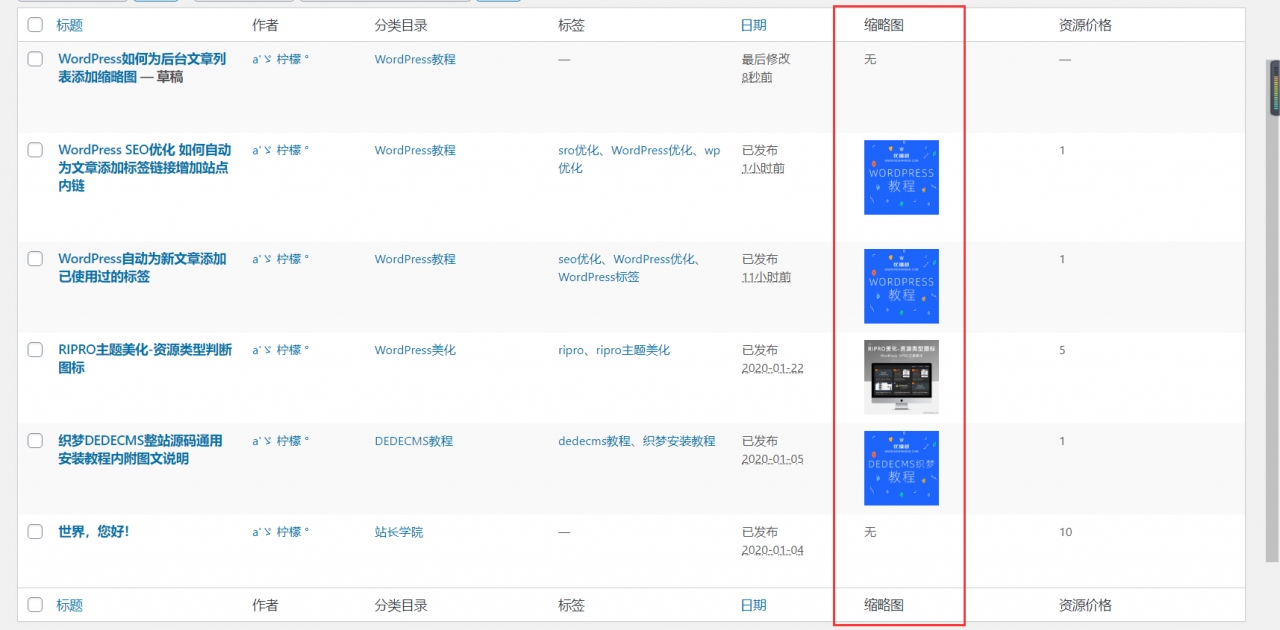
目前很多 wordpress 主题都具有缩略图功能,但你想没想过后台文章列表也可以显示缩略图,貌似之前有个插件可以实现这一功能,不过名称忘了,所以今天给大家推荐两个简单的方案。
方法一
就是在您的 wordpress 后台文章列表里面的右侧可以显示出当时有设置特色图片文章的图片缩略图,很实力的一个小的增强功能,可以更方法的将文章封面展示在列表里,免除了打开内容或是跳转前端确认文章封面特色图片的步骤。找到我们主题的 functions.php 文件在里面添加以下代码:
/**
* WordPress 后台文章列表设置文章特色图片(缩略图)集成版
* Plugin Name: Easy Thumbnail Switcher
*/
class doocii_Easy_Thumbnail_Switcher {
public $add_new_str;
public $change_str;
public $remove_str;
public $upload_title;
public $upload_add;
public $confirm_str;
public function __construct() {
$this->add_new_str = __( \’添加\’);
$this->change_str = __( \’更改\’);
$this->remove_str = __( \’移除\’);
$this->upload_title = __( \’上传特色图片\’);
$this->upload_add = __( \’确定\’);
$this->confirm_str = __( \’你确定?\’);
add_filter( \’manage_posts_columns\’, array( $this, \’add_column\’ ) );
add_action( \’manage_posts_custom_column\’, array( $this, \’thumb_column\’ ), 10, 2 );
add_action( \’admin_footer\’, array( $this, \’add_nonce\’ ) );
add_action( \’admin_enqueue_scripts\’, array( $this, \’scripts\’ ) );
add_action( \’wp_ajax_ts_ets_update\’, array( $this, \’update\’ ) );
add_action( \’wp_ajax_ts_ets_remove\’, array( $this, \’remove\’ ) );
add_image_size( \’ts-ets-thumb\’, 75, 75, array( \’center\’, \’center\’ ) );
}
/**
* 安全检查
*/
public function add_nonce() {
global $pagenow;
if( $pagenow !== \’edit.php\’ ) {
return;
}
wp_nonce_field( \’ts_ets_nonce\’, \’ts_ets_nonce\’ );
}
/**
* 加载脚本
*/
public function scripts( $pagenow ) {
if( $pagenow !== \’edit.php\’ ) {
return;
}
wp_enqueue_media();
wp_enqueue_script( \’doocii-ets-js\’, get_template_directory_uri() . \’/js/script.js\’, array( \’jquery\’, \’media-upload\’, \’thickbox\’ ), \’1.0\’, true );
wp_localize_script( \’doocii-ets-js\’, \’ets_strings\’, array(
\’upload_title\’ => $this->upload_title,
\’upload_add\’ => $this->upload_add,
\’confirm\’ => $this->confirm_str,
) );
}
/**
* The action which is added to the post row actions
*/
public function add_column( $columns ) {
$columns[\’ts-ets-option\’] = __( \’缩略图\’);
return $columns;
}
/**
* 显示列
*/
public function thumb_column( $column, $id ) {
switch( $column ) {
case \’ts-ets-option\’:
if( has_post_thumbnail() ) {
the_post_thumbnail( \’ts-ets-thumb\’ );
echo \’
\’;
echo sprintf( \’%s\’, esc_attr( $id ), $this->change_str );
echo sprintf( \’ %s\’, esc_attr( $id ), $this->remove_str );
} else {
echo sprintf( \’%s\’, esc_attr( $id ), $this->add_new_str );
}
break;
}
}
/**
* AJAX保存更新缩略图
*/
public function update() {
// 检查是否所有需要的数据都设置与否
if( !isset( $_POST[\’nonce\’] ) || !isset( $_POST[\’post_id\’] ) || !isset( $_POST[\’thumb_id\’] ) ) {
wp_die();
}
//验证
if( !wp_verify_nonce( $_POST[\’nonce\’], \’ts_ets_nonce\’ ) ) {
wp_die();
}
$id = $_POST[\’post_id\’];
$thumb_id = $_POST[\’thumb_id\’];
set_post_thumbnail( $id, $thumb_id );
echo wp_get_attachment_image( $thumb_id, \’ts-ets-thumb\’ );
echo \’
\’;
echo sprintf( \’%s\’, esc_attr( $id ), $this->change_str );
echo sprintf( \’ %s\’, esc_attr( $id ), $this->remove_str );
wp_die();
}
/**
* AJAX回调后删除缩略图
*/
public function remove() {
// Check if all required data are set or not
if( !isset( $_POST[\’nonce\’] ) || !isset( $_POST[\’post_id\’] ) ) {
wp_die();
}
// Verify nonce
if( !wp_verify_nonce( $_POST[\’nonce\’], \’ts_ets_nonce\’ ) ) {
wp_die();
}
$id = $_POST[\’post_id\’];
delete_post_thumbnail( $id );
echo sprintf( \’%s\’, esc_attr( $id ), $this->add_new_str );
wp_die();
}
}
new doocii_Easy_Thumbnail_Switcher();
以下代码保存为 script.js,保存至 主题名/js 目录下:
(function($) {
“use strict”;
if( typeof ts_ets === \’undefined\’ ) {
window.ts_ets = {};
ts_ets.upload_frame = false;
}
$(document).on( \’click\’, \’button.ts-ets-remove\’, function() {
ts_ets.tmp_id = $(this).data(\’id\’);
ts_ets.tmp_parent = $(this).closest(\’td.ts-ets-option\’);
if( !confirm( ets_strings.confirm ) ) {
return;
}
$.ajax({
url: ajaxurl,
method: “POST”,
data: {
action: \’ts_ets_remove\’,
nonce: $(\’#ts_ets_nonce\’).val(),
post_id: ts_ets.tmp_id
},
success: function( data ) {
if( data != \’\’ ) {
ts_ets.tmp_parent.html( data );
}
}
});
});
$(document).ready(function() {
ts_ets.upload_frame = wp.media({
title: ets_strings.upload_title,
button: {
text: ets_strings.upload_add,
},
multiple: false
});
ts_ets.upload_frame.on( \’select\’, function() {
ts_ets.selection = ts_ets.upload_frame.state().get(\’selection\’);
ts_ets.selection.map( function( attachment ) {
if( attachment.id ) {
$.ajax({
url: ajaxurl,
method: “POST”,
data: {
action: \’ts_ets_update\’,
nonce: $(\’#ts_ets_nonce\’).val(),
post_id: ts_ets.tmp_id,
thumb_id: attachment.id
},
success: function( data ) {
if( data != \’\’ ) {
ts_ets.tmp_parent.html( data );
}
}
});
}
});
});
});
$(document).on( \’click\’, \’button.ts-ets-add\’, function(e) {
e.preventDefault();
ts_ets.tmp_id = $(this).data(\’id\’);
ts_ets.tmp_parent = $(this).closest(\’td.ts-ets-option\’);
if( ts_ets.upload_frame ) {
ts_ets.upload_frame.open();
}
});
})(jQuery);
方法二
这款是给大家一个更简单的版本,减少了上传与删除功能,只是一个显示调用功能,方便大小进行缩略图查看,因为更多的用户习惯是进入文章上传特色图片,很少人会通过后台列表就直接上传缩略图,所以今天给大家推荐一个更简单的方案。将下面的代码复制到当前 wordpress 主题的 functions.php 模板文件中,保存即可:
if ( !function_exists(\’fb_AddThumbColumn\’) && function_exists(\’add_theme_support\’) ) {
// for post and page
add_theme_support(\’post-thumbnails\’, array( \’post\’, \’page\’ ) );
function fb_AddThumbColumn($cols) {
$cols[\’thumbnail\’] = __(\’Thumbnail\’);
return $cols;
}
function fb_AddThumbValue($column_name, $post_id) {
$width = (int) 35;
$height = (int) 35;
if ( \’thumbnail\’ == $column_name ) {
// thumbnail of WP 2.9
$thumbnail_id = get_post_meta( $post_id, \’_thumbnail_id\’, true );
// image from gallery
$attachments = get_children( array(\’post_parent\’ => $post_id, \’post_type\’ => \’attachment\’, \’post_mime_type\’ => \’image\’) );
if ($thumbnail_id)
$thumb = wp_get_attachment_image( $thumbnail_id, array($width, $height), true );
elseif ($attachments) {
foreach ( $attachments as $attachment_id => $attachment ) {
$thumb = wp_get_attachment_image( $attachment_id, array($width, $height), true );
}
}
if ( isset($thumb) && $thumb ) {
echo $thumb;
} else {
echo __(\’None\’);
}
}
}
// for posts
add_filter( \’manage_posts_columns\’, \’fb_AddThumbColumn\’ );
add_action( \’manage_posts_custom_column\’, \’fb_AddThumbValue\’, 10, 2 );
// for pages
add_filter( \’manage_pages_columns\’, \’fb_AddThumbColumn\’ );
add_action( \’manage_pages_custom_column\’, \’fb_AddThumbValue\’, 10, 2 );
}



