




WordPress 分类目录的描述添加可视化编辑器
默认情况下,WordPress后台的 分类目录 的描述只能添加纯文本内容,今天分享一下为 WordPress 分类目录的描述添加可视化编辑器的方法。
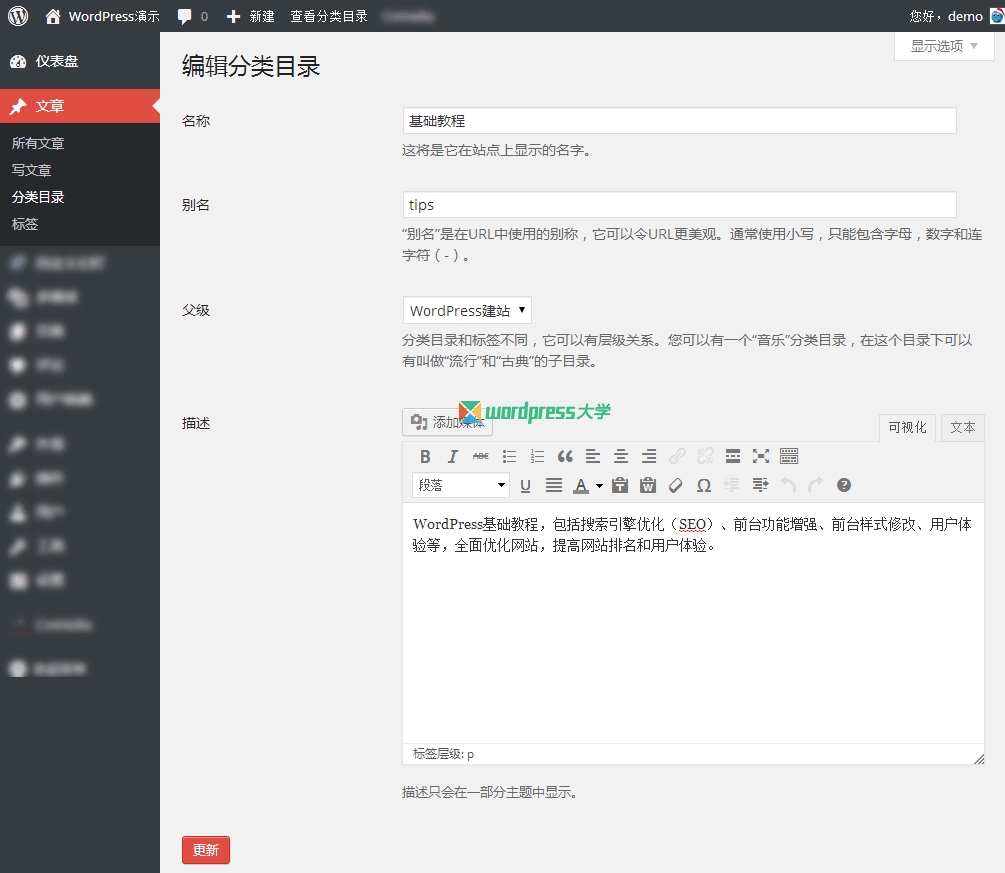
将下面的代码添加到当前主题的 functions.php 即可:
/**
* 为 WordPress 分类目录的描述添加可视化编辑器
*/
// 移除HTML过滤
remove_filter( ‘pre_term_description’, ‘wp_filter_kses’ );
remove_filter( ‘term_description’, ‘wp_kses_data’ );
//为分类编辑界面添加可视化编辑器的“描述”框
add_filter(‘edit_category_form_fields’, ‘cat_description’);
function cat_description($tag)
{
?>
<table class=”form-table”>
<tr class=”form-field”>
<th scope=”row” valign=”top”><label for=”description”><?php _ex(‘Description’, ‘Taxonomy Description’); ?></label></th>
<td>
<?php
$settings = array(‘wpautop’ => true, ‘media_buttons’ => true, ‘quicktags’ => true, ‘textarea_rows’ => ’15’, ‘textarea_name’ => ‘description’ );
wp_editor(wp_kses_post($tag->description , ENT_QUOTES, ‘UTF-8’), ‘cat_description’, $settings);
?>
<br />
<span class=”description”><?php _e(‘The description is not prominent by default; however, some themes may show it.’); ?></span>
</td>
</tr>
</table>
<?php
}
//移除默认的“描述”框
add_action(‘admin_head’, ‘remove_default_category_description’);
function remove_default_category_description()
{
global $current_screen;
if ( $current_screen->id == ‘edit-category’ )
{
?>
<script type=”text/javascript”>
jQuery(function($) {
$(‘textarea#description’).closest(‘tr.form-field’).remove();
});
</script>
<?php
}
}



